


This collab badge was debuted at our DefCon33 vendor booth, and lucky for you, we have some left.
There is a VERY limited number of these badges remaining and once they are sold out, they will not be restocked nor will we be producing anymore of them.
Each Badge comes with:
- Rabbit-Labs 18650 battery preinstalled
- A Rabbit-Labs Pruple lanyard
- A Foxx SAO – She lights up when presented with a static shock!
- ESP32 S3 N16R8 powered – Lots of Memory and RAM for you to play around with!
- 18650 Charge Controller w/ PD Negotiation and Reverse Polarity / Over current protection
- Dual 100mW 433Mhz CC1101 Modules by Ebyte
- 32 High-Powered Addressable RGB LEDs
- Onboard UART for Interfacing with the ESP32
- SAO Port w/ GPIO access to the ESP32
For full functionality, you will need to add a small OLED screen specs: 1.3″ inch OLED Display Screen Module I2C 4pin 128×64 SH – 1106 3.3V-5V IIC Address 0x3C White for Arduino 2560 Nano ESP8266 ESP32
(Available on Amazon – https://www.amazon.com/dp/B0CCL88VTG)
the Pinout of the screen is very important.
VCC | GND | SCL | SDA
This pinout should be read from left to right, when holding the badge upside down (screen is installed covering the two CC1101 modules)
There are currently two base firmware options for the badge, though you are more than welcome to fork and/or create your own.
Badge Firmware by RockegGod – Full Functionality w/ LCD and LED control (GitHub) https://github.com/RocketGod-git/Defcon33-TPP-RL-badge
Badge Firmware by zRCrackiiN and JBOHack – Limited LED only Functionality (Blinken Lights) (GitHub): https://github.com/zRCrackiiN/Defcon33-TPP-RL-badge
Note: There is a Fix for the SD Card to operate the SD in 4-Bit SDIO mode. This is the fastest SD Card mode available for the ESP32S3.
Please use the following code:
void initializeSDCard(bool displayOK) {
debugPrint(“[+] Init SD Card…”, true, displayOK, 500);
if(! SD_MMC.setPins(SD_CLK, SD_CMD, SD_DAT0, SD_DAT1, SD_DAT2, SD_DAT3)){
Serial.println(“Pin change failed!”);
return;
}
if(!SD_MMC.begin(“/sdcard“)) { // 4-bit mode
Serial.println(F(“[!] SD Card Mount Failed”));
if(!SD_MMC.begin()) {
Serial.println(F(“[!] SD Card initialization failed”));
debugPrint(“No SD Card”, true, displayOK, 1000);
sdCardPresent = false;
} else {
Serial.println(F(“[+] SD Card initialized (4-bit mode)”));
debugPrint(“SD Card OK (4-Bit)!”, true, displayOK, 500);
sdCardPresent = true;
}
} else {
Serial.println(F(“[+] SD Card initialized (4-bit mode)”));
debugPrint(“SD Card OK!”, true, displayOK, 500);
sdCardPresent = true;
}
How to operate the Badge:
Load Firmware of your choosing, if you are using the full-featured firmware by RocketGod, you will have access to the two CC1101 modules as well as fine-tuned control of the LEDs on the front of the badge.
If you are using the “Blinken Lights” version by ZRCrackiin and JBOHack, you will want to change the LED patterns by pushing left and right on the joystick on the rear of the badge.
To turn on / off the badge – Press “Power” once to turn on, double-tap to turn off.
Important Note #1 – In order to flash the badge, you will need to use UART. the USB Port is primarily used for charging the 18650 cell and USB Communication can become unstable during charging causing the ESP32 to fail flashing.
the pinout for the UART is as follows:
Read from LEFT to RIGHT with “UART” on the left and GND on the right (next to the ESP32 module)
3v | RX | TX | GND
You will want to flash it as an ESP32S3 DEV Module if you are using Arduino Studio.
Important Note #2 – While the RX has been fully tested with both CC1101 modules, TX has not been fully tested and is not guaranteed to work out of the box… You may need to modify code to enable transmission. We cannot assist with this.
Important Note #3 – While the badge is designed to be compatible with both “slow” USBC chargers as well as PD Fast Chargers it will sometimes error out with some non-standard chargers. That said, with a proper charger It is able to fully charge the 18650 safely with an onboard charge controller, as well as a safety fuse and reverse polarity protection as well.
Pinout of the ESP32 Module:
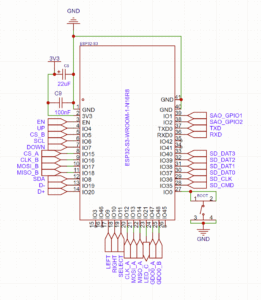
Thank you to everyone that made this project, this badge, come to life!
RocketGod, zR_CrackiiN , JBOHack, neednotapply, Talking Sasquach, Frank, HamSpiced, AWOK, JCMK


